

Free to start online Telegram bot that sharpens blurry photos, brings old family pictures back to life and erases watermarks or strangers from a shot.
About ImageUpscaleBot | Photo Upscaler & Restorer
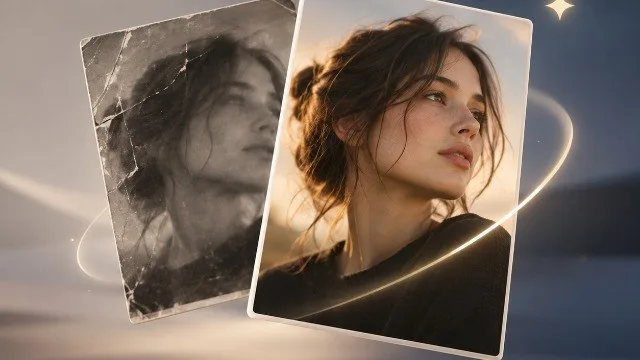
Send a photo you've never been happy with and see what it looks like when this Telegram bot is done with it. A soft, low-resolution image comes back larger and cleaner. A scratched, faded print from a drawer gets restored. A passer-by in the corner of your best shot, or a watermark across it, can simply be taken out online.
What you can ask it to do
Three things, and it does them well enough to be worth a chat: upscale an image, restore an old photo, remove an unwanted object. It takes a single picture or a whole album at once, so a stack of scanned family prints doesn't mean a stack of separate conversations.
For removal you tell it in plain words what should disappear when it asks. Something like "the man in the red jacket"or "the text across the bottom"is the kind of thing you describe.
What it's like to use
Open it and the first thing you see is a short note and a list of commands. Drop in your image, pick the action and wait for the result. If you change your mind halfway, /cancel stops processing that is still running.
One habit worth having: send your pictures as files rather than as ordinary photos. Telegram compresses regular photos, and sending them as files keeps the original quality for the bot to work with.
Free to start, credits after that
Light use costs nothing. When you need more, /buy lets you pay for credits with Telegram Stars, /balance shows what you have left, and /terms spells out how processing and purchases work. If a payment goes wrong, /paysupport is there for it. You can switch the bot's language with /language.
Features
- Upscales single images and whole albums in one go
- Restores old, faded or damaged photos
- Removes unwanted objects and watermarks: you just describe what to erase
- Send images as files to keep their original quality
- Free to start; extra credits are bought with Telegram Stars via /buy
How to use ImageUpscaleBot | Photo Upscaler & Restorer
- 1 Open ImageUpscaleBot in Telegram and press Start.
- 2 Send an image or an album, ideally as a file to keep full quality.
- 3 Choose an action: upscale, restore or remove an object. For removal, describe what should go.
- 4 Use /balance to check your credits, or /buy to top them up with Telegram Stars.
FAQ about ImageUpscaleBot | Photo Upscaler & Restorer
Is this photo upscaler bot free?
Free to start for light use. For heavier use you buy credits with Telegram Stars through /buy.
Can it remove a watermark from a photo?
Yes. Choose the remove option and describe what to erase, for example the watermark or a person in the background.
How do I keep the original quality?
Send your images as files instead of regular photos. Telegram compresses ordinary photos, which would lower what the bot has to work with.
Can I process several photos at once?
Yes, you can send an album and pick the action for it. To stop something still in progress, use /cancel.